
- Real Time Telematics Platform on MongoDB
- MongoDB Zero Shot Semantic Serach
- Building an AI-Powered Recommendation System using RAG, MongoDB, Ollama, and Gemini
- AI Database Features
- Understanding Agentic AI: The Shift from Passive Models to Autonomous Agents
- The AI Blockchain
- Model Context Protocol (MCP) vs Agent to Agent (A2A) Protocol
- Responsible AI
- Building a CI/CD Pipeline for Machine Learning Using AWS Services
- DeepSeek Architecture
- Machine Learning for Beginners. Your roadmap to success.
- The Machine Learning Algorithms List: Types and Use Cases
- Harnessing Machine Learning for Advanced A/V Analysis and Detection
- TensorFlow Lite vs PyTorch Mobile for On-Device Machine Learning
- Generative AI presents new opportunities for accelerating human achievement
- Unlocking the true potential of AI with UiPath business automation
- AI for good: Three principles to use AI at work responsibly
- Transforming healthcare document processing with AI
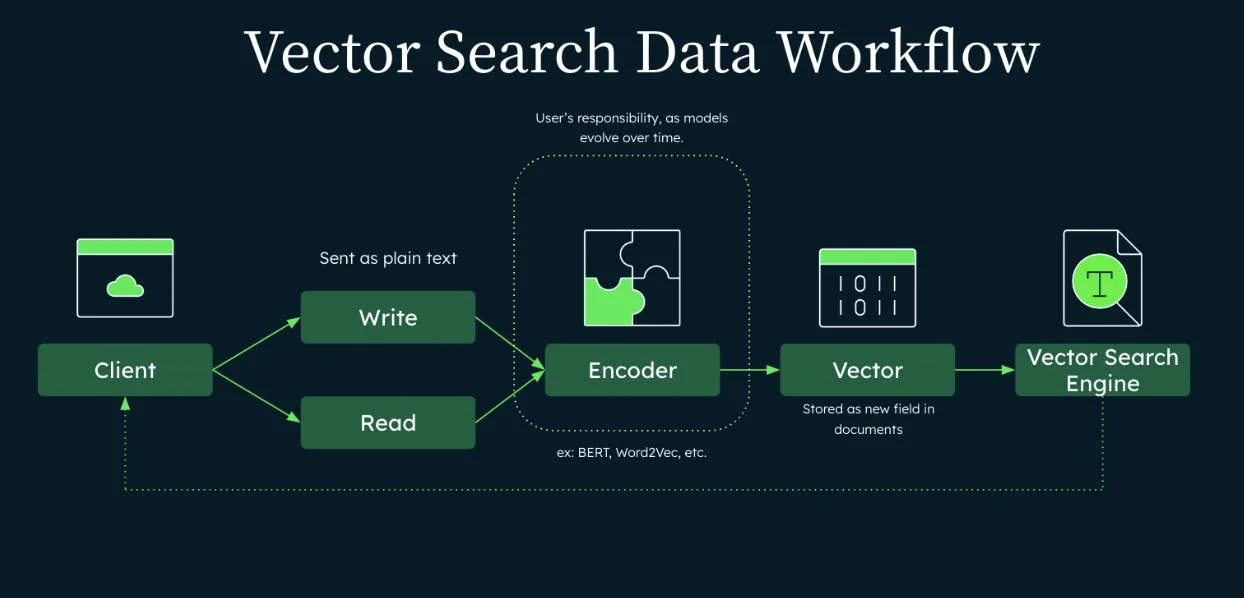
MongoDB Zero Shot Semantic Serach
Keyword search is like asking a librarian, “Do you have a book with the word spaceship?”
Semantic search is like asking, “Got anything that feels like Interstellar but with fewer tears?”
That second one is where vector search shines: it retrieves by meaning, not exact words. MongoDB supports this via the $vectorSearch aggregation stage, purpose-built for semantic search over stored embeddings.
Keyword search is great until your user types “lappy” instead of “laptop.” Then it’s just guesswork with confidence.
What “Zero‑Shot Semantic Search” Means:
Zero-shot here means: you didn’t train a custom model for your domain. You just:
- generate embeddings with an off-the-shelf model,
- store them in MongoDB,
- query using $vectorSearch.
The Basic Architecture
Ingest time
- Take each document’s text (title + description + tags)
- Create an embedding vector (array of floats)
- Store it in a field like embedding
Query time
- Embed the user query into a vector
- Run $vectorSearch over that field
- Return top‑K results + similarity score
Step 1 — Create A Vector Search Index (Atlas Search Index JSON)
Create a vector index mapping the embedding field with dimensions matching your embedding model.
{
"fields": [
{
"type": "vector",
"path": "embedding",
"numDimensions": 384,
"similarity": "cosine"
},
{ "type": "filter", "path": "category" }
]
}
Step 2 — Store Documents + Embeddings
Below is an example that can be used to repliacte with Voyage AI.
from pymongo import MongoClient
import voyageai
import os
# 1) Voyage AI client
vo = voyageai.Client(api_key=os.environ["VOYAGE_API_KEY"])
# Embed into a single vector
def embed(text):
result = vo.embed(
texts=[text],
model="voyage-3-large", # or voyage-3-lite
input_type="document"
)
return result.embeddings[0]
client = MongoClient(os.environ["MONGODB_URI"])
def ingest():
col = client["demo"]["articles"]
docs = [
{
"title": "MongoDB Vector Search 101",
"body": "Learn semantic search with embeddings and $vectorSearch.",
"category": "mongodb"
},
{
"title": "RAG for busy engineers",
"body": "Retrieval-Augmented Generation without losing your weekend.",
"category": "genai"
}
]
for d in docs:
text = f"{d['title']}\n{d['body']}\n{d['category']}"
embedding = embed(text)
col.insert_one({
**d,
"embedding": embedding
})
print("Ingest complete ✅")
client.close()
if __name__ == "__main__":
ingest()
Step 3 — Query With $VectorSearch (Semantic Search In MongoDB)
MongoDB’s $vectorSearch is an aggregation stage that performs semantic similarity search over indexed embeddings and can return a relevance score via $meta: "vectorSearchScore".
from pymongo import MongoClient
import voyageai
import os
# Voyage AI client
vo = voyageai.Client(api_key=os.environ["VOYAGE_API_KEY"])
client = MongoClient(os.environ["MONGODB_URI"])
def embed(text):
result = vo.embed(
texts=[text],
model="voyage-3-large", # or voyage-3-lite
input_type="query"
)
return result.embeddings[0]
def semantic_search(query, limit=5, category=None):
col = client["demo"]["articles"]
query_vector = embed(query)
pipeline_agg = [
{
"$vectorSearch": {
"index": "articles_vector_index",
"path": "embedding",
"queryVector": query_vector,
"numCandidates": 100,
"limit": limit,
**(
{"filter": {"category": {"$eq": category}}}
if category
else {}
)
}
},
{
"$project": {
"_id": 0,
"title": 1,
"category": 1,
"score": {"$meta": "vectorSearchScore"}
}
}
]
results = list(col.aggregate(pipeline_agg))
client.close()
return results
if __name__ == "__main__":
results = semantic_search(
"how to do meaning-based search in mongodb",
limit=3
)
print(results)
Why those knobs matter:
- numCandidates trades performance for recall (bigger = “search harder”).
- filter lets you pre-filter by metadata (tenant, category, access control) before similarity ranking.
- vectorSearchScore gives you an interpretable ranking score.
A Few Crisp Best Practices (So It Doesn’t Feel Like Magic Duct Tape)
- Keep embeddings consistent: same model for docs + queries, same dimensions.
- Normalize if using cosine/dot product (many text embedding pipelines normalize by default; good for stable similarity).
- Store operational + vector data together: it simplifies your app and lets you filter with normal MongoDB queries.





Subscribe to our mailing list to get the new updates!

Subscribe our newsletter to stay updated